

Tools and Technologies
- Qt framework
- C++ (C++20 standard)
- QML
- Visual Studio
- React JS
- Node JS
- Material UI
- Visual Studio Code
- Figma
- Git, GitLab (earlier SVN, when codebase was hosted at Embitel)
- SourceTree (also used via command line)
- Redmine
- TestLink
- Qt Creator (IDE)
About the Customer
Our customer is a global manufacturer (OEM) of cutting-edge vision, optical, inductive, and ultrasonic sensing solutions for industrial environments. Their award-winning industrial sensing and image processing solutions are aimed at automating product inspection during various stages of manufacturing.
These products have created global impact by enabling quick and accurate defect detection during manufacturing, assembly & intralogistics across the automotive, robotics, EV battery and F&B industries.
Business Challenge
An industrial sensing and image processing solution, at its basic level, consists of a high-resolution camera & image processing software.
The camera is tasked to capture images of the manufactured artifacts. The software then runs a series of pre-defined image processing algorithms and inspection scenarios to understand if the artifact has met the manufacturer’s standards & specifications.
To develop such a solution, the OEM had in-house expertise in embedded hardware, device driver, image processing algorithm development and manufacturing. However, developing an industrial vision and image processing device takes more than that.
Realising that, the customer reached out to Embitel due to the innovative approaches we have employed in engineering custom industrial IoT solutions in the past.
Embitel's Solution
Our partnership with this customer started in 2008, and since then the customer has gained significant trust in Embitel’s IoT expertise. This has made us their trusted software development partner for more than a decade.
During our partnership tenure, we’ve supported the customer in releasing three generations (Gen 1, Gen 2 and Gen 3) of industrial vision camera systems.
While the form factor of the camera systems remained identical, each generation supported significantly higher image resolution, processing power, memory, configuration capacity and newer, smarter capabilities. They include – autofocus, laser-assisted measurement, 3D coordinate output, AI/ML classification, remote device configuration, management and many more.
Our team developed the industrial camera system’s firmware application and software to access the above-mentioned functionalities and value-added capabilities. We established remote device accessibility by developing:
- Desktop Application
- Web Application
- Mobile Application
- End-to-end HMI development for the apps
Desktop Application Development
Our team of IoT experts have developed, maintained and improved the desktop application, right from the first version to the latest release. The was on Qt and C++. Here’s what our in-depth engineering expertise made possible:
Device Discovery Application
This application helps the users scan the local network for connected & available vision sensor devices from the manufacturer. Additionally, it also supports the manual addition of devices outside the network by adding their IP addresses.
The industrial desktop application is highly beneficial for industries with large deployments, as the starting point for remote device management.
Apart from finding devices, the application enables users to manage device level-configuration, such as:
- Device properties: Name, description, IP, and network interfaces, DNS and NTP settings
- Pre-purchase simulator: We’ve integrated an offline simulator that allows prospective customers to understand the image processing algorithms that are available across different product variants. Users can upload their own images into the desktop application, choose the product variant and see the exact algorithms, calibration methods and measurement parameters available for their use case. This enables the user to make an informed purchase decision.
- Image Transmission Settings: Operators can choose between full-quality or compressed transmission of images to the application based on the network availability and performance requirement.
- Time Synchronization and DNS server configuration.
- Device Configuration Application
- Users can configure the image acquisition setting to inspect the vision sensing device’s capability. They can do this by toggling through shutter speed, working distance, gain, resolution and more. In addition to this, users can also configure other parameters such as white balance, image pre-processing, lens calibration and cycle time.
- Users can set up the alignment of the industrial camera for specific colour channels, positioning parameters, speed, result offset and gripping space.
- A job file consists of the details of the device configuration and algorithms used to perform an inspection. The job file size limit expanded from 50 MB in Gen 1 to 120 MB in Gen 2 and 480 MB in Gen 3 devices.
- Users can choose from the OEMs proprietary algorithms and select up to 255 jobs on one vision sensing camera system. The algorithms execute identification, positioning, inspection, measurement, AI classification and result processing.
- Users can set up Image Acquisition Parameters such as resolution, shutter speed, and trigger mode (continuous capture or hardware triggered capture).
- Users with role-based access can configure digital I/O pins and link the I/O pins to specific ML algorithms and external devices for prompt notification.
- The desktop app gives users access to software-controlled autofocus, laser and 3D coordinate visualization for applications requiring precise results.
- The offline, downloadable version of the desktop application opens doors to help potential customers make buying decisions. Users can load their test images and run them through any combination of algorithms to evaluate the sensor’s capability.
Live Results Application
We developed a read-only application that can be accessed by the operators on the factory floor. This application provides live visibility into the inspection results, such as pass/fail, statistics and image output.
Specific capabilities include:
- Live image display with pass/fail result overlays and running statistics
- Operators can switch between pre-configured job files for different products during a shift.
- Role-based access enforcement: lower-permission users cannot reset statistics or perform actions reserved for admin-level users
Through this desktop application, engineers and supervisors set up job files and sensor configurations. To set up the industrial camera device, the application opens doors to granular level configuration:
Web Application Development
Our engineering team was involved in the web application development. Introduced with the Gen 2 camera systems, the web application runs directly on the vision sensor, allowing users to access it from any browser-enabled device on the same network without installing software.
- The first release provided a view-only interface for monitoring live inspection results, pass/fail statistics, and captured images from PCs, tablets, or mobile devices.
- Configuration capabilities were progressively added. The current version supports barcode and data code detector configuration, with additional algorithms planned for future releases.
- The web interface and local dashboard operate on the same job file stored on the device, ensuring that configuration changes made from either interface are immediately synchronized.
- The web app is optimized for mobile browsers, enabling shop-floor supervisors to monitor inspection performance from smartphones and tablets within the factory network.
- The customer roadmap includes expanding web-based configuration to additional detection algorithms, including a next-generation detector that will be available exclusively through the web interface.
- The web application also provides up to 16 simultaneous browser connections to the same device. This allows multiple supervisors/operators to monitor live inspection results from different devices on the network.
Mobile Application
In addition to the desktop and web application, our team was also involved in Android and iOS mobile application development.
The mobile application is a minimal version of the desktop app, and it enables:
- Discovery of all vision sensor devices within the network.
- Connecting to devices outside the local network by entering relevant IP addresses manually.
- Modification of the device name, description and IP address.
- Updating device access credentials.
Embitel's Impact
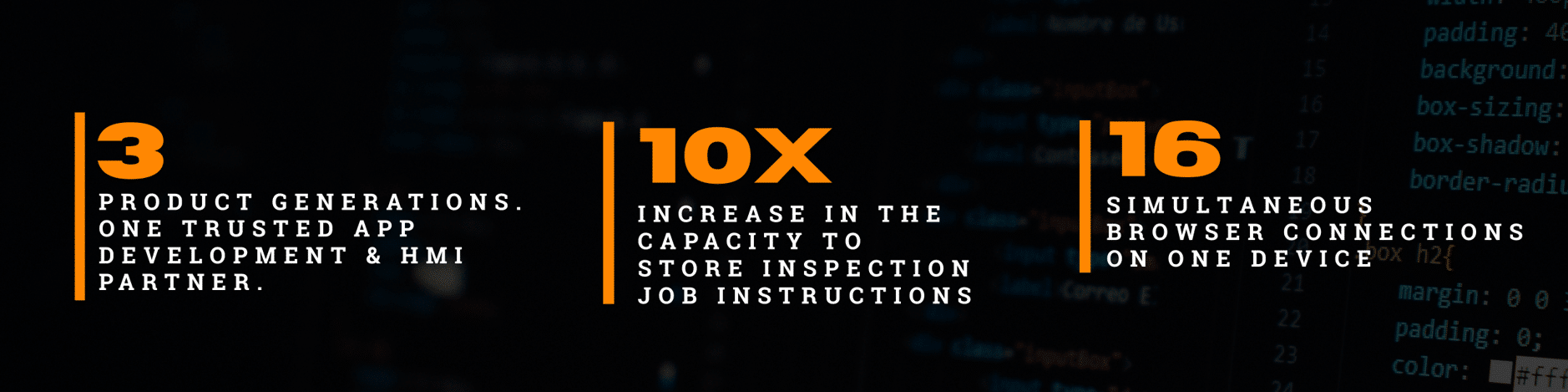
- Sustained an 18-year engineering partnership, supporting three generations of the customer’s vision sensor platform.
- Developed and continuously enhanced the desktop application from version 0, with the software shipped alongside every vision sensor sold.
- Enabled prospective customers to evaluate inspection capabilities before hardware purchase through an offline simulation environment, helping reduce adoption barriers.
- Enabled seamless platform evolution, accommodating nearly 10x growth in configuration & job data and the introduction of 3D and AI/ML algorithms within the same software ecosystem.
